Product · 2025.06 – 2025.08
Dynamic web crawler
A Streamlit + Selenium tool for pages that load as you scroll: point it at a list page, say how to find the items — XPath, CSS, ID, class, tag or a regular expression — and it scrolls, collects the links, visits each page, extracts built-in and custom fields, and lands the rows in Excel, CSV or a MySQL table it creates itself.
- Role
- Solo developer — built by hand, summer 2025
- Period
- 2025.06 – 2025.08
- Stack
- Python · Streamlit · Selenium (Edge WebDriver) · BeautifulSoup + lxml · pandas · MySQL
- Scale
- 3,404 lines of Python · 11 modules · 5 locator modes + 8 regex patterns · Bilingual UI (ZH / EN) · Run on juejin.cn: 60 links, 60 pages, 4.6 min
- Links
- GitHub ↗
Exhibits
Personal project, summer 2025. Exhibits 3 and 5 come from one instrumented run of the tool against juejin.cn on 11 October 2026, driven by the tool's own crawler class: counts and timings were recorded, page content was not kept.
- Code
- 3,404 linesPython · 11 modules · bilingual UI
- Ways to locate
- 5 + 8XPath, CSS, ID, class, tag · 8 regex patterns
- Run: links collected
- 604 scroll rounds · 10 s
- Run: pages extracted
- 60 of 60title and body on every page · 4.6 min
What one run does, step by step
- Target URL + locatorslist page or single article
- Edge WebDriverheadless · 30 s page-load timeout
- Wait for the main elementup to 30 s
- Count what is loadedenough? collect · else scroll
- Scroll loopto the bottom · 1 s pause · stop after 3 idle rounds or 20
- Collect linkshref of every match · deduplicated
- Visit each page1 s between pages
- Extract fieldstitle · body · images · custom fields
- ExportExcel · CSV · MySQL table it creates
- Search the tableregex over the stored HTML
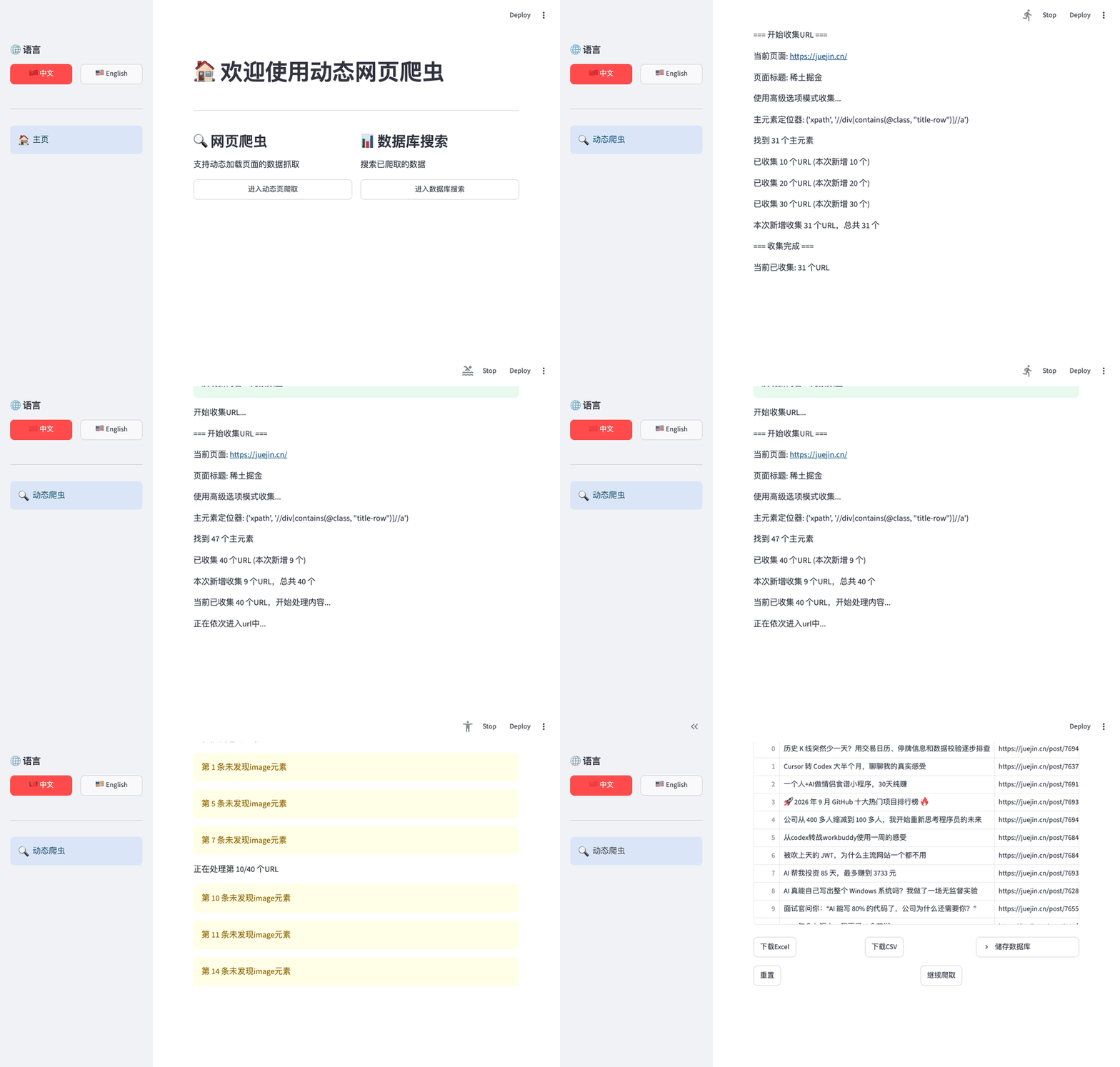
The tool running: the same crawl, recorded
Streamlit UI · 40 articles from juejin.cn · real time for the first seconds, then sped up · ends on the results table
One run on juejin.cn: what each scroll round loaded
bars = article links on the page when the round started · dots = links collected by the end of it · x = seconds since the page opened · target 60
What the tool can be pointed at
locate → extract → store, as implemented
Locate
Exact
- XPath
- CSS selector
- ID
- Class
- Tag
By pattern (regex)
- URL
- Phone
- Phone (+86)
- International phone
- Image
- Name (2–4 CJK characters)
- Age
Extract
Page modes
- Infinite-scroll list → article pages
- Single article page
Built-in fields
- Title
- Body text
- Image URLs
- Raw HTML
Custom fields
- Text
- Link / URL
- Image
- Any locator mode
Store & search
Export
- Excel (.xlsx)
- CSV
MySQL
- Table created from the data
- Types inferred: INT · FLOAT · DATE · DATETIME · VARCHAR(500) · LONGTEXT
- Table name validated against injection
- Batch insert
Search
- Regex over stored HTML: URL · phone · email · image · name
Session
- Config saved to JSON between runs
- Bilingual UI (ZH / EN)
The table this run would create
column types inferred from the 60 extracted rows · fill = share of rows with a value
| Column | MySQL type | Where it comes from | Filled |
|---|---|---|---|
title | VARCHAR(500) | h1.article-title | 100% |
url | VARCHAR(500) | link collected from the list | 100% |
content | LONGTEXT | #article-root, text | 100% |
image | LONGTEXT | #article-root img, src values | 75% |
HTML | LONGTEXT | page source | 100% |
author | VARCHAR(500) | .author-name .name (custom field) | 93% |
published | LONGTEXT | .meta-box time (custom field) | 93% |
views | VARCHAR(500) | .views-count (custom field) | 93% |
Problem
News and community sites load their lists as you scroll: a request to the page returns the first twenty items and nothing else. Scraping them means driving a real browser, and the people who wanted the data — classmates collecting articles for coursework — did not want to write Selenium code for every site. The tool had to take a URL and a description of where the items are, and do the rest. It was built by hand over two months in the summer of 2025.
Decisions
Drive a real browser, count before scrolling. The crawler opens the page in Edge, waits for the main element, and counts how many items are already there. Only if that is short of the target does it scroll (Exhibit 1). Each round scrolls to the bottom, pauses one second, and counts again; it stops when the target is met, after three rounds that add nothing, or at twenty scrolls.
Locate by selector or by pattern. Items can be found exactly, with XPath, a CSS selector, an ID, a class or a tag, or by a regular expression over the page: URLs, phone numbers, emails, images, names (Exhibit 4). Custom fields use the same locators, so author, date and view count were added to the run without touching code.
Let the data decide the table. Exporting to MySQL creates the table from the rows: integers, floats, dates and datetimes get their own types, short strings become VARCHAR(500), long ones LONGTEXT (Exhibit 5). Table names are validated so a user cannot inject SQL through the form.
Keep the configuration. Every run’s settings are saved to JSON and reloaded next time, and the UI is bilingual, because the users were.
Result
The run behind the exhibits asked for 60 article links from juejin.cn. The page opened with 29, three scroll rounds brought it to 63, and the crawler had its 60 within 10 seconds (Exhibit 3). Visiting the 60 pages took four and a half more minutes and produced 60 rows with a title and body on every one, custom fields on 93% and images on 75%. The tool wrote the table schema from those rows: five short columns as VARCHAR(500), body, images and raw HTML as LONGTEXT.
Limits
One configuration serves one site layout; when the site changes its class names the selectors have to be redone. Pages are visited one at a time with a fixed pause, so a run costs four to five seconds per page, and a page that times out is skipped. The idle-round stop is crude: a slow network can look like the end of the list. There is no handling of robots.txt or rate limits beyond the pause, no login flow (the checkbox is a placeholder), and only Edge is supported.
04
Gallery
Home: two tools in one app, the crawler and a search over what it stored; Chinese or English from the sidebar. Crawler setup: target URL, list page or single article, how many items, request header, driver path, wait and pause times, headless mode. Advanced filter: a locator mode and selector for the list links, the title, the body and the images. This is the juejin.cn configuration the run used. Database search: pick a table and a pattern — URL, phone, name, email, image — to pull matches out of the stored HTML.